zchat.zsh
A full-screen, split-pane AI chat client that pushes modern Zsh to its limits: native TCP, JSON, persistence, streaming, Markdown rendering, and a responsive curses interface without an application framework.
No hidden runtime: the application itself does not invoke curl, jq, Python, fold, coreutils, or another external runtime utility.
Current on main — v1.0.11: copy any visible transcript through a stable plain-text view, backed by stricter HTTP limits, private runtime storage, safer persistence, and clean signal handling.
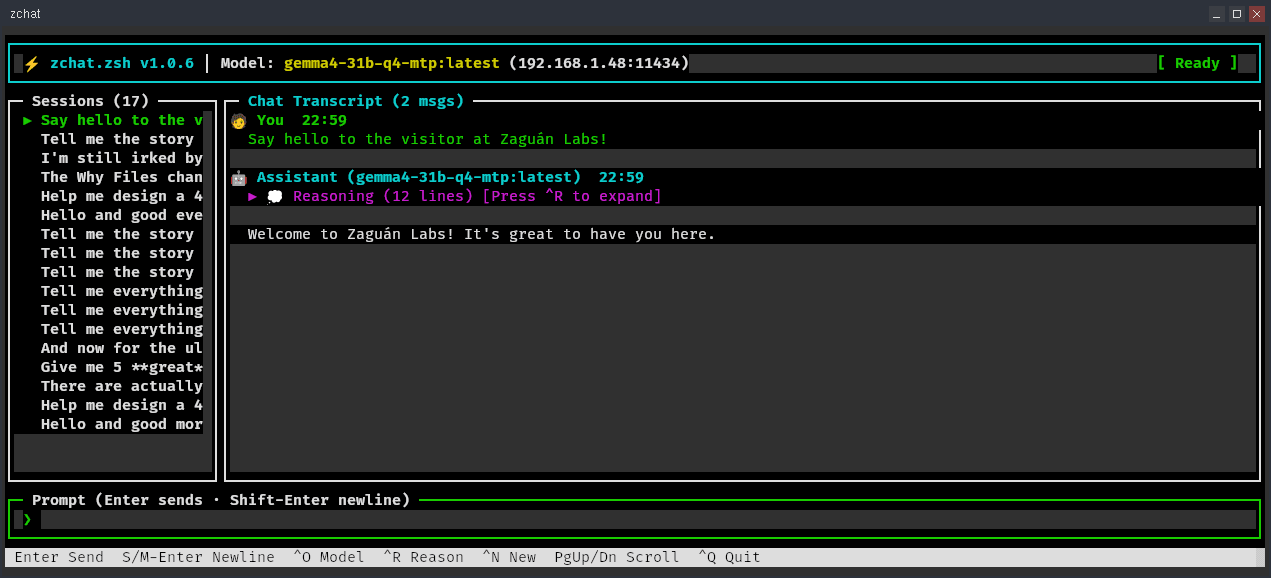
A Terminal Interface, Not a Prompt Loop
Live Reasoning
Reasoning and response tokens stream separately; completed thinking collapses into a toggleable summary line.
Rich Markdown
Headings, code fences, tables, lists, blockquotes, links, and inline styles render directly in the terminal.
Responsive Panes
Sessions, transcript, multiline input, model state, and shortcuts adapt as the terminal resizes.
Persistent Sessions
Private, directory-backed sessions retain the full visible transcript and bounded continuation checkpoints with fast incremental saves.
Transcript Copy
Press Ctrl+Y or run /copy to open the visible conversation as stable plain text for native terminal selection.
Hardened Runtime
Bounded parsing, exact writes, private temporary storage, and safer shutdown paths protect the native Zsh runtime.
Native All the Way Down
A background Zsh worker consumes Ollama's chunked NDJSON stream through zsh/net/tcp. The curses event loop reads only newly appended stream bytes, reuses cached transcript prefixes, and refreshes every window as one frame. Indexed native-Zsh paths avoid repeated full-data scans, while v1.0.11 adds bounded HTTP parsing, private runtime storage, and symlink-safe persistence.
Model Picker
Browse installed Ollama models and switch without leaving the interface.
Context Control
Automatic checkpoints preserve a recent raw tail while keeping long conversations within budget.
Safe Streaming
Malformed, incomplete, and cancelled streams fail closed instead of persisting partial assistant messages.
Compile It. Feel the Difference.
Run make compile to turn zchat's Zsh libraries into .zwc wordcode. Zsh can load that compiled code directly instead of parsing every library at launch, making startup feel dramatically faster. Current wordcode is used automatically; stale files are ignored, so compilation stays an optional optimization.
make compile   # Generate lib/*.zwc
make clean     # Remove compiled wordcode
Quick Start
zchat connects to Ollama at localhost:11434 by default. Export OLLAMA_HOST, pass --host, or use /host inside the TUI to talk to another server. Zsh 5.8 or newer and its standard loadable modules provide the complete client runtime.
ollama pull gemma4:12b
git clone https://github.com/ZaguanLabs/zchat.zsh.git
cd zchat.zsh
make compile
./zchat.zsh

# Use a remote Ollama server
export OLLAMA_HOST=RemoteHost:11434
./zchat.zsh --model MODEL_NAME
Small Surface, Full Conversation
zchat is deliberately focused on conversation rather than coding tools. It keeps model selection, system prompts, context inspection, chat history, cancellation, and reasoning control one keystroke—or one slash command—away.