zcoder.zsh
A capable coding agent for Ollama, built almost entirely in Zsh. Work locally with warm-up TUI, or run the complete agent beside a remote model and workspace while keeping the focused terminal interface in front of you.
No application framework: HTTP, JSON, tool dispatch, sessions, and the interface use native Zsh modules. External programs like rg and git are reserved for the capabilities they actually provide.
New in v0.18.0: explicitly authorized editing workers for Claude, Codex, Agy, and OpenCode, plus safer tool execution, transport recovery, private runtime storage, and hardened workspace writes.
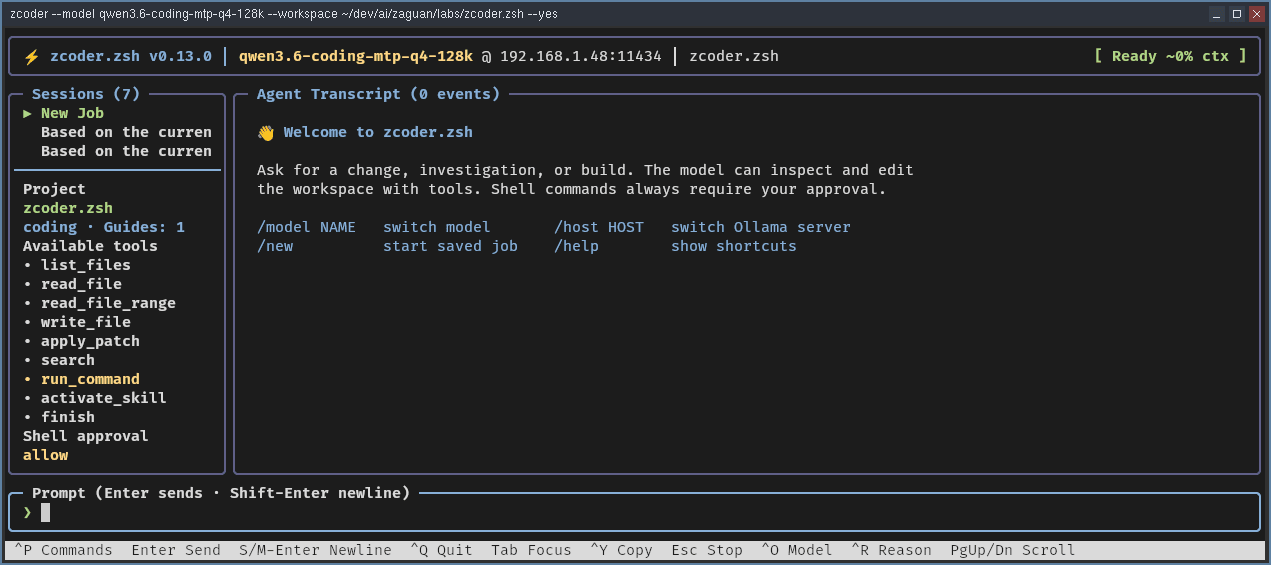
A Real Agent Loop
zcoder follows a compact observe → decide → act → check cycle. It has no arbitrary model-turn ceiling while progress continues. Repeated outcomes and short alternating cycles trigger one final recovery turn; another violating round is stopped before execution.
Search and bounded file reads
Workspace-confined writes and patches
Approved build and test commands
Agent Skills and project guidance
stdio MCP servers
Persistent local and remote sessions
More Model Dialects
Normalizes LFM planner envelopes, alternate action fields, foreign tool-call shapes, and shell-command plans into one guarded pipeline.
Multi-call Turns
Independent reads and commands in one Ollama response run in model order, with the configured approval policy applied to every command.
Bounded Recovery
Malformed plans, false tool errors, and empty responses get a limited chance to recover instead of masquerading as completed work.
Call in a Specialist. Keep the Boundaries.
Ask Claude, Codex, Agy, or OpenCode for a second opinion without handing over the workspace. Add ! only when you want one external harness to make a workspace-confined editing pass.
Read-only by Default
/claude, /codex, /agy, and /opencode consult without permission to change files.
One Explicit Edit Run
The matching ! command uses the provider's native edit mode or sandbox, confined to the selected workspace.
Verify the Report
Worker output enters context as an untrusted report; the main agent inspects the workspace before treating any claim as proof.
Authority stays narrow: workers cannot install, deploy, commit, push, or publish. Editing workers remain disabled in the sysadmin profile because their internal commands cannot participate in per-command approval.
Ready Before You Press Enter
The interactive TUI warms the selected Ollama model with the resolved system prompt and project instructions while you type, showing Warming Up until the model is ready. The disposable request never enters your transcript, saved session, or context ledger—and your first real prompt safely takes priority.
Local Warm-up
Loads the model and stable project context before the first real turn, without polluting the conversation.
Remote Readiness
Clients verify that the server's configured model is resident before each prompt and wait if it must be reloaded.
Your Choice
Use --no-warmup when eager model loading is not what you want.
Project-Aware by Default
Hierarchical AGENTS.md files, discoverable Agent Skills, and stdio MCP tools are built in. zcoder reads project guidance and context from the workspace itself, so every run starts aligned with your conventions.
AGENTS.md Precedence
Nested files override parent configs, letting teams maintain global defaults alongside project-specific instructions.
Agent Skills
Discover and activate scoped skill sets for specific domains, from SQL to React patterns, without polluting the base agent.
MCP Integration
Use stdio MCP servers to extend tools and access external data sources while staying inside the trusted workspace.
Communication Between Agents
Multiple zcoder instances on the same machine can discover each other via a private Unix socket, pass tasks along, and queue follow-ups for later. You can work with several focused agents without manual handoffs.
Auto Discovery
Running instances find each other without configuration. Task delivery happens over private sockets, not the network.
Task Queuing
Drop follow-up prompts for another agent to pick up when it's free. No need to hold a conversation open.
ACP Clients
Run --acp to expose zcoder as an Agent Client Protocol v1 agent over stdio, or connect through the remote API.
One Agent, Two Deliberate Profiles
zcoder does not treat software development and host administration as the same job. The default coding profile is built for project work; --profile sysadmin switches to a dedicated operations prompt and a stricter execution policy.
coding — the default
Searches before reading broadly, works in small verifiable steps, edits only inside the selected workspace, and asks before shell commands run. You may approve one command or the rest of the session.
sysadmin — guarded operations
Begins with read-only diagnosis and requires approval for every exact command. Its prompt emphasizes least privilege, backups, rollback, validation, secret redaction, and extra care around storage, networking, SSH, boot, authentication, and critical services.
./zcoder.zsh --profile sysadmin \
  --model qwen3-coder \
  --workspace /path/to/maintenance-workspace
Safeguards stay in force: sysadmin mode rejects --yes and session-wide approval. Workspace file tools remain confined, host access goes through individually approved commands, and a pre-execution guard rejects unmistakably catastrophic operations.
Safety You Can See
Safer Workspace Writes
File tools stay inside the workspace, reject dangling symlinks and non-regular targets, and open validated paths without following symlinks.
Private Runtime Storage
Command output, patches, HTTP results, worker exchanges, and MCP files share an atomically created process-private directory.
Trustworthy Terminal Output
Control bytes render visibly instead of altering approval prompts or transcripts; redirected output remains exact for scripts.
Every tool call keeps its own validation, safety guard, approval, result, and error. v0.8.0 ships with 730 automated tests covering external workers, partial writes, private permissions, terminal controls, symlink handling, multi-call execution, patch recovery, and transport replay.
Compile It for a Faster Launch
Run make compile once and zcoder precompiles its Zsh libraries to .zwc wordcode, roughly halving launch time. Zsh automatically uses current wordcode and ignores it when the matching source is newer, so this is a safe, optional speed boost—not a separate build you have to maintain.
make compile   # Generate lib/*.zwc
make clean     # Remove compiled wordcode
Try It Locally
You need Zsh 5.8+, ripgrep, a running Ollama server, and a model with tool-calling support. zcoder uses localhost:11434 by default. Set OLLAMA_HOST or pass --host to use Ollama on another machine. Download v0.18.0 for the released baseline; cloning main follows ongoing development.
ollama pull qwen3-coder
git clone https://github.com/ZaguanLabs/zcoder.zsh.git
cd zcoder.zsh
make compile
./zcoder.zsh --model qwen3-coder \
  --workspace /path/to/project

# Use a remote Ollama server
export OLLAMA_HOST=remote-host:11434
./zcoder.zsh --model qwen3-coder --workspace .
Your Terminal Here. The Agent There.
Start zcoder with --server on the machine that owns the project. The model connection, workspace, conversation, project instructions, Skills, MCP processes, and every tool stay on that host. Connect with --connect and your local zcoder becomes a thin, responsive TUI.
Remote Execution
The server owns the model, source tree, agent state, and tool execution—not just the Ollama connection.
Persistent Remote Jobs
Browse server-owned sessions in the local sidebar, reopen older transcripts, and keep each named server's work across restarts.
Server-enforced Policy
The remote host fixes the workspace, model, profile, and command policy. A connected client cannot replace them.
Prompts and streamed events stay in your local TUI, exact command approvals return to you without deadlocking the remote worker, and Escape cancels the active turn. If the server's model was displaced, zcoder reloads it before starting queued work.
# On the remote machine
./zcoder.zsh \
  --server "Workshop Mac" \
  --token-file ~/.config/zcoder/remote.token \
  --model qwen3-coder \
  --workspace /path/to/project

# On your local machine
./zcoder.zsh \
  --connect workshop-mac.local:7337 \
  --token-file ~/.config/zcoder/remote.token
Secure the connection: remote mode uses token-authenticated plain HTTP. Use it on a trusted, firewalled LAN or through an SSH or VPN tunnel—never expose port 7337 directly to the internet.
This is more than --host, which connects a local zcoder process to a remote Ollama server while keeping the workspace and tools local. Remote-agent mode moves the whole working environment to the server.